Fix Media: x86-64 / GModPatchTool Guide (FAQ)
Table of Contents
- What is the x86-64 beta?
- What is Awesomium / gmod-html / Chromium Embedded Framework?
- What is GModPatchTool (formerly GModCEFCodecFix)?
- What are the System Requirements for GModPatchTool?
- I'm getting "ConnectError," "SSL Error," "Connection forcibly closed", "Connection reset," or some other connection error when trying to run the tool
- All Platforms: GMod is crashing / not opening / has no main menu even after applying the fix
- Linux / ChromeOS: GMod is crashing / not opening / has no main menu even after applying the fix
- macOS: GMod is crashing / not opening / has no main menu even after applying the fix
- GModPatchTool is trying to use the wrong Steam install (usually with "Multiple Steam Installations Detected")
- macOS: I'm getting "(null) is not allowed to open documents in Terminal"
- Is GModPatchTool open source? Can I support the project somehow?
- I want to completely uninstall GModPatchTool. How do I do that?
What is the x86-64 beta?
The x86-64 beta is a beta for Garry's Mod (GMod) that enhances it with 64-bit builds, larger memory limits, a newer version of LuaJIT, and most importantly replaces Awesomium with gmod-html and Chromium Embedded Framework.
What is Awesomium / gmod-html / Chromium Embedded Framework?
Chromium Embedded Framework, aka CEF, is an embeddable and open-source version of Google Chrome that can be used in games and other applications.
It's basically GMod's built-in web browser. It's what allows gamemodes/addons like YukiTheater, Cinema, and Media Player to work.
gmod-html is the "glue" that connects GMod to CEF in the x86-64 beta.
Awesomium is a very old version of CEF that was never updated beyond Chrome 18 (circa 2012).
It can't connect to or interact with most websites now, but is still included on the main (non-beta) version of GMod on some platforms.
What is GModPatchTool (formerly GModCEFCodecFix)?
GModPatchTool is a tool that patches Garry's Mod, updating/improving CEF, fixing common launch/performance issues (esp. on Linux/Proton/macOS), and more.
GModCEFCodecFix refers to the old version of the same tool, when it was written in Python instead of Rust.
GModPatchTool Features:
- Fixes various launch/missing main menu issues on macOS and Linux
- Brings CEF up to date
- Improves CEF in several ways such as Enabling Proprietary Video/Audio codecs, Enabling Software WebGL, Improving texture update performance, and more
- Can fix Steam Overlay/MangoHud/etc not working on Linux
- Improves appearance of Legacy VGUI + fixes debug/console fonts for Proton users
- ...and more (full list)
What are the System Requirements for GModPatchTool?
- Windows: Windows 10 22H2 or newer.
- Linux: We only test on Ubuntu (22.04 or newer), and the current stable version of Steam OS. You may still be able to use this tool on other Linux distributions, but your mileage may vary.
- macOS: macOS 11 Big Sur or newer.
I'm getting "ConnectError," "SSL Error," "Connection forcibly closed", "Connection reset," or some other connection error when trying to run the tool
Your antivirus, internet service provider, or government is breaking the tool's connection to GitHub/our website.
Try adding an exception for GModPatchTool in your antivirus software.
If that doesn't work, using a VPN like ProtonVPN, Cloudflare WARP/1.1.1.1, or Mullvad will probably fix it.
All Platforms: GMod is crashing / not opening / has no main menu even after applying the fix
Note: Occassionally there will be an update to Garry's Mod that requires us to regenerate the patches for GModPatchTool.
Please let us know if you follow all of the steps below and you're still having issues!
First, make sure you're using the latest release of the tool. The tool tells you if you're up to date when it starts.
Even if you're up to date, run the the tool again (watching for any errors). If it says "applied successfully" in green, try running the game again.
If that doesn't work, go to Steam > Garry's Mod > Properties > General > Launch Options and make sure the following is NOT present:
-nochromium
If it is, remove it and try again.
If it's still not working and you're on Linux or macOS, read below.
Linux / ChromeOS: GMod is crashing / not opening / has no main menu even after applying the fix
CEF isn't being initialized. Check chromium.log for clues.
unprivileged user_namespaces: The main way this happens is due to the game not having access to unprivileged user_namespaces.
There are two common causes for this:
-
You're running GMod/Steam in a container or sandbox that doesn't allow for unprivileged user_namespaces.
This is most often the case with Flatpak.
GModPatchTool should be able to deal with this automatically.
If it can't, try switching to the native packaged version of Steam for your distribution (and report the issue to us).
-
Your kernel does not have unprivileged user_namespaces enabled. Run the following in your Terminal application:
sudo sysctl -w kernel.unprivileged_userns_clone=1Note: The command needed to enable it on your distribution may differ. The one above will work for Debian/Ubuntu-based systems.
ChromiumCache: Another possibility is that ChromiumCache is failing to initialize due to some sort of filesystem issue. You can usually fix this by simply running the tool again.
exFAT / NTFS: exFAT and NTFS filesystems typically have issues with GMod/CEF. The tool cannot fix these issues automatically. To fix it, you will have to move GMod to a partition with a filesystem that's supported, like ext4.
macOS: GMod is crashing / not opening / has no main menu even after applying the fix
Go to Steam > Garry's Mod > Properties > General > Launch Options and add this to open GMod in windowed (non-fullscreen) mode:
-windowed
There's a known issue with GMod on macOS where it sometimes won't open in fullscreen mode.
If it's still not opening, go to Steam > Garry's Mod > Properties > General > Launch Options and add this to temporarily disable your addons:
-noaddons -noworkshop
There's a known issue with GMod on macOS where some addons will cause the game to crash on startup.
If it works with addons disabled, try removing them until you've found the one that's causing you to crash.
If it still crashing with the addon-disabling launch options, Contact Us, providing the following information:
- The most crash report for GMod as seen in macOS's Console.app (if available)
- GMod's in-game console output (if available)
- GModPatchTool's output
- chromium.log (can be found with Steam > Garry's Mod > Properties > Installed Files > Browse...)
Note: Garry's Mod is not well supported on macOS and may not be supported at all in the future.
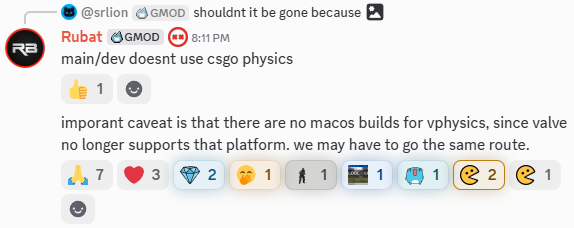
Should it become no longer supported natively, please consider the options for playing the Windows version of Garry's Mod on macOS.
GModPatchTool is trying to use the wrong Steam install (usually with "Multiple Steam Installations Detected")
You can use GModPatchTool's --steam_path argument to force using a specific path.
We strongly recommend only having one installation of Steam on your PC, if possible. There's a short list of legitimate reasons why you might need more than one.
macOS: I'm getting "(null) is not allowed to open documents in Terminal"
You're likely using macOS 13.0, which has a bug that prevents launching certain applications.
Update to the latest version of macOS 13 Ventura and try again.
If that doesn't work, make sure you're installing GModPatchTool to the Applications folder before running it.
Is GModPatchTool open source? Can I support the project somehow?
Yes it is! The GitHub repo can be found here: https://github.com/solsticegamestudios/GModPatchTool
You can also find the GitHub repo for our fork of gmod-html, here: https://github.com/solsticegamestudios/gmod-html
💖 If you'd like to support the project, consider throwing a few dollars our way! You can also help us by contributing code directly with Pull Requests.
I want to completely uninstall GModPatchTool. How do I do that?
- Go to Steam > Garry's Mod > Properties > Installed Files and click Verify integrity of game files. This will remove the changes made to the game files.
- Delete the GModPatchTool executable and associated files you downloaded.
-
Remove the temporary files directory. On each operating system, it can be found at:
- Windows:
%LOCALAPPDATA%\GModPatchTool - macOS:
$HOME/Library/Caches/GModPatchTool - Linux / ChromeOS:
$XDG_CACHE_HOME/GModPatchTool
- Windows:
-
If you used the old GModCEFCodecFix tool, you may need to clean up its temporary directory as well:
- Windows:
%LOCALAPPDATA%\Temp\GModCEFCodecFix - macOS:
$HOME/Library/Caches/GModCEFCodecFix - Linux / ChromeOS:
$XDG_CACHE_HOME/GModCEFCodecFix
- Windows:
For most users, just following Step 1 will achieve the desired effect. The other steps just delete any remnants of the tool from your storage.